Interpolation
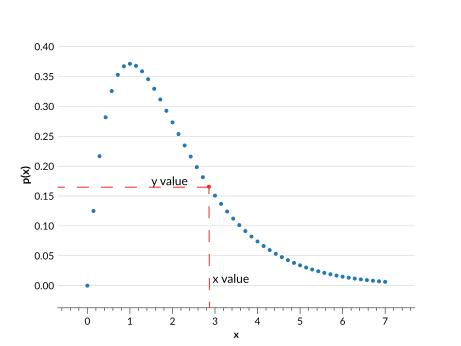
Interpolated distributions are defined with:
\(x\) values (
xvals): \(n\) ordered values representing points on the distribution.\(y\) values (
yvals): \(n\) values that correspond to the probability associated with each \(x\) value.
Use cases
The interpolation parameterization works well for most distributions, provided there is a high enough density of \(x\) values. It linearly interpolates between each point, so it does a poor job of reproducing curves. Keep in mind that all distributions in an Ensemble must have the same \(x\) values, so the \(x\) values have both the range and the density necessary to represent all of the distributions.
To get around this requirement, you can use the Irregular interpolation parameterization, though this will significantly slow down code performance for large datasets.
Behaviour
Interpolated Ensembles operate in the following ways:
Ensemble.pdf(x)usesscipy.interpolate.interp1dto linearly interpolate the PDF inside the range of givenxvals, and returns 0 outside that range.Ensemble.cdf(x)usesscipy.interpolate.interp1dto linearly interpolate the CDF from the cumulative sum at the givenxvals. It is not the direct integral ofEnsemble.pdf(). Outside the range of givenxvalsit returns 0 or 1 as appropriate.Ensemble.ppf(x)usesscipy.interpolate.interp1dto linearly interpolate based on the cumulative sum at the givenxvals, with the \(x\) and \(y\) inputs inverted.Ensemble.x_samples()returns the \(x\) values from the metadata.
Data structure
See Data Structure for general details on the data structure of Ensembles.
Metadata Dictionary
Key |
Example value |
Description |
|---|---|---|
“pdf_name” |
|
The parameterization type |
“pdf_version” |
|
Version of parameterization type used |
“xvals” |
|
The \(x\) values shared for all distributions, with \(n\) values |
Data Dictionary
Key |
Example value |
Description |
|---|---|---|
“yvals” |
|
The values corresponding to each \(x\) value, of shape (\(n_{pdf}\), \(n\)) |
Note
\(n_{pdf}\) is the number of distributions in an Ensemble.
Ensemble creation
>>> import qp
>>> import numpy as np
>>> xvals = np.linspace(0,1,5)
>>> yvals = np.random.rand(2,5)
>>> ens = qp.interp.create_ensemble(xvals=xvals, yvals=yvals)
>>> ens
Ensemble(the_class=interp,shape=(2,5))
Required parameters:
xvals: The array containing the \(n\) \(x\) values shared by all of the distributionsyvals: The array containing the (\(n_{pdf}\),\(n\)) probability values corresponding to each \(x\) values
Optional parameters:
ancil: The dictionary of arrays of additional data containing \(n_{pdf}\) valuesnorm: If True, normalizes the input distributions. If False, assumes the given distributions are already normalized. By default True.warn: If True, raises warnings if input is not valid PDF data (i.e. if data is negative). If False, no warnings are raised. By default True.
For more details on creating an Ensemble, see Creating an Ensemble, and for more details on this function see its API documentation.
Conversion
There method used to convert an Ensemble to this parameterization is: extract_vals_at_x().
Example:
>>> ens_i = qp.convert(ens, 'interp', xvals=np.linspace(0,1,5))
>>> ens_i
Ensemble(the_class=interp,shape=(2,5))
Required argument: xvals, where xvals are the \(x\) points at which to calculate the value of the PDF for each distribution.
Make sure that the range of the \(x\) values covers the full range of data in the input distributions, or the converted data will be inaccurate. The conversion process includes an automatic normalization of the data, which will change the input distributions if they are missing data points.
Conversion to an interpolation is quite simple. It calls the qp.Ensemble.pdf() function of the input Ensemble with the given xvals, and creates the new interpolated Ensemble from using the given xvals and the PDF values as yvals.